Thursday, 19 April 2018

Major Project: Poster Design

An important part of any film production is the design of the poster.

POSTER DESIGN

Having already created a logo for 'Bobbie & Clive' earlier in the process, designing a poster wasn't going to take too long because we had something to work off. I completed some research into the heist genre and their designs for posters. Here are a few examples:


They all use a mixture of the colours red, white, and black. They also all have images of the main cast on the front in action style poses. As well as this they all have distinct logos and dark tones.

The poster for the original 'Bonnie & Clyde' looks like this:


Like the others it uses the colours red, white, and black and features the main characters in an action style pose. I like the tagline "they're young... they're in love... and they kill people". I think I might adapt that and use that for 'Bobbie & Clive'. I also like how the images on the poster are painted on, instead of just being printed photographs. This was a common style around the time 'Bonnie & Clyde' was released. I would like to use that style on my poster too.

For the 'Bobbie & Clive' poster I wanted to go for something that looked similar to our logo design. I also wanted to use some of the ideas shown in other heist film poster examples, and the 'Bonnie & Clyde' poster.

After messing around a bit in photoshop, using photos from our shoot, I came up with this:


I adapted the tagline from the 'Bonnie & Clyde' by rewording it to match our film. Bobbie & Clive are middle-aged, they are married and they do need cash. It follows a similar flow to the 'Bonnie & Clyde' tagline, but matches our storyline better. I have use the colours red, white, and black as they are common in this genre of posters. The red, yellow and purple are also the colour scheme established by the logo for this film. Overall I prefer the portrait poster more.

As a group we continued to work on this poster, making small changes to the layout and animated look of the image, and eventually this was our final design:


I think this final poster design represents our film very well. It stands out which is always good for a poster, and I think it will draw people in to watching the film. It follows the genre conventions of a poster and uses the correct layout for a film poster.

Wednesday, 18 April 2018

Major Project: Credits Creation

I recently saw a film called Game Night which had an interesting credits sequence that'd I'd like to replicate and adapt for 'Bobbie & Clive'.

CREDITS CREATION

In the film 'Game Night' a group of friends accidentally end up getting involved in a kidnapping when they believe is it part of a game night game. It turns out that their neighbour had set the entire thing up as a joke because he never gets invited to the game nights. The end credits sequence details this neighbours plan for this set up. It does so by showing up a series of clippings and photographs all pinned to a pin board in his basement. It's a really interesting credits sequence that draws the audiences attention and makes them stay to watch. It also represents the style of the film really well.

This inspired me to do something similar for 'Bobbie & Clive'. I wanted the credits sequence to provide the audience with the details of Clive's plan for the heist to fail. I feel this will work well because the audience don't actually what Clive did to make sure it did fail. This will give the credits sequence some purpose and will prevent it from just being another generic white text on a black screen credits sequence.

I will create this credits sequence in Affect Effects and Photoshop. The background images of the information on the pin board will be made with Photoshop, and I will animate them and add text in After Effects.

I created a visual script for the credits sequence so I could work out what visual should go with each credit. Some of the visuals link to the credit. For example, for produced by I will create an image with a schedule for Clive's plan in it, as the producer creates schedules for the film production.


My next step was to create the background images in Photoshop. I want each one to look like a series of clippings pinned on to a pin board. Below are some of the images I created.


Next I put all of the images into After Effects, added the credits text, added some small movement to each one and created this credits sequence:


Overall I really like this credits sequence. I won't say it's unique because the idea for it comes from another film, however it does make our film stand out. It's something people will hopefully remember and hopefully people won't switch off before the credits finish. This sequence will be edited into the final cut of the film.

Sunday, 25 March 2018

Major Project: Production Day 3

Almost a week after production started, it was time for our third production day.

PRODUCTION DAY 3

Upon arrival we discovered that the location had changed again since out last production day. The company had moved some furniture around and we were not allowed to move it back. We quickly came up with a solution to this. All we had to do was reshoot our wide shots for scene 7, as you couldn't tell were the furniture was in our close ups and additional shots. This was not ideal as we were already behind schedule but we had no other choice.

Once this was solved we moved on to redressing the office and storage room. Unfortunately we couldn't keep everything set up during the week so we needed to do it all again. We had taken lots of pictures during the second production day so we had good references for the posters, props and boxes.

Our actors arrived on time (we had asked Sophie to come in later as we didn't need her for the start of the day), and once they had settled in I ran them through the changes to the day. We had to shoot scenes 1, 3, 4, 8, 9, 10, & 12, so we had a lot to do and not a lot of time to do it.

We began by filming the second half of scene 7 with Craig in it as Frank. I ran the actors through the scene, blocking it out with them and then rehearsing it. Once everyone was happy we began shooting the scene starting with all of the wide shots. We then moved into the close ups and additional shots. It was at this point that the actors highlighted an issue with part of the scene. I was able to resolve this issue and we carried on filming.

When we were happy with the coverage we had we continued by filming scene 9 as it takes place in the same location and uses the same two actors. Again I started by blocking through the scene with Nik and Craig and then they rehearsed it a couple of times. Once we were all happy, we began filming. During filming, Sophie arrived so Ellie went to get her ready so we could continue into scenes with her without having to pause for too long.

Once scenes 7 & 9 were wrapped, we filmed scene 8 that had all three cast members in. During the blocking it became clear that part of the scene wasn't going to work at all, so I had to come up with something else. Originally the toy laser gun was meant to fall out of Bobbie's pocket and onto the floor whilst she was hiding. We didn't have a way of doing that. It's something we forgot to plan for, but luckily we were able to come up with an alternative that still worked well for the story. Once this was sorted, we rehearsed it and carried on filming. We also made time to reshoot the wide shots for the beginning of scene 7.

After completing scenes 7, 8, & 9 the office location was wrapped and de-rigged. By doing it at this point, we saved ourselves some time at the end of the day.

We had a break and then continued filming by moving onto scene 12. This is the final scene of the film, and was the last scene we needed Craig for. As with all other scenes I began by blocking through the scenes with the actors, and then they rehearsed it. Once everyone was happy we began filming starting with the wide shots and then moving in for the close ups and additional coverage. For this scene we used George, a student on the course, for a minor character role. He did a very good job and took direction well. Whilst filming this scene we had a section where Craig had to drop a box of apples. I had the idea to shoot this part with two cameras so we could get two angles of it at the same time. This saved us having to reset the box twice as many times.

Once we'd wrapped scene 12, we sent Craig on his way and continued by filming scenes 3 & 4. Because we were running very behind, I decided to cut scene 3 down from 4 shots to one shot. We shot the scene in one shot on a stabilised camera. Fingers crossed it works out in the edit and we don't need anymore coverage for that scene. We then shot scene 4, which was a simple three camera set up so we were able to get through it quickly. Finally we shot scene 10, and all we had left was scene 1 which we could do without the actors so we saved it until last.

As we ended up saving some time filming scenes 3 & 4, we went back and reshot some stuff from scene 2, as when we reviewed the footage during the week, there were some extra angles we wanted to get.

We managed to wrap pretty much on time, but it ended up being a late finish for the crew because we had a lot of de-rigging to do. We did however save some time because we de-rigged the office earlier in the day, and whilst we were filming outside we had people de-rigging the storage room.

Overall I am happy with how the final production day went. Although we had to rush a few things, I think we still got enough coverage and good performances to fill the edit with. I'm looking forward to editing this film together, and I'm very glad the production days are out of the way.

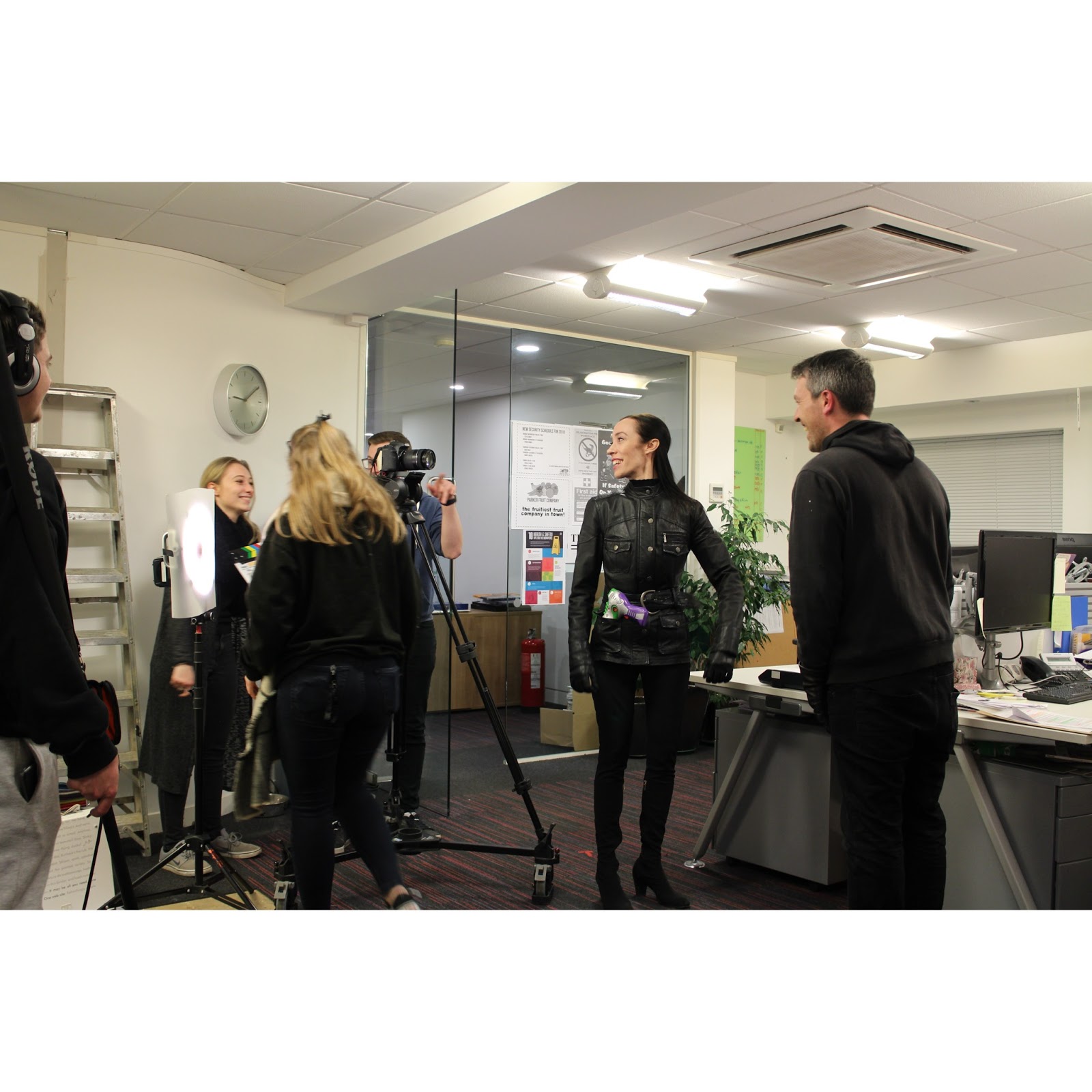
Here are some behind the scenes photos from production day 3:


Monday, 19 March 2018

Major Project: Footage Logging and Setting The Edit Up

Although we haven't finished production yet, I wanted to get an early start on logging all of the footage and sound as I know it will take a while.

FOOTAGE LOGGING

In this instance, when I say footage logging I mean watching back the footage and listening to the audio and logging everything so it's easier to sync up in post. To do this I will rename each clip using the slate information. By doing this when I'm editing I will be able to work out which clips I need to sync up just by looking at their file names.

Below is an example of what this looked like in the end:


The numbers mean:

6.9 (shot number) _6 (scene number) _1 (take number)

The sound files with the (2) are there because each take has two channels of audio in two separate files. The first is the boom mic and Clive's mic, and the second has Bobbie's mic and a blank channel. This means during the syncing process I will need to split the channels up onto three timeline tracks so I know which is which. By doing the logging now, that process will be made easier.

This was a long process, and I still have more to do after the third production day, but overall it will save me a lot of time during the editing stages of the production. Sitting and watching all of the footage and listening to all of the sound has also highlight a couple of issues, so we will need to reshoot some things on our third production day. I'm very glad I did this.

SETTING UP THE EDIT

To save myself more time in post, I have set my edit up already. This just involved configuring all of the settings, creating and organising all of my bins, and importing all of the renamed footage and audio clips that we have so far.

These are my sequence settings:


My research and own personal experience tells me these are the correct settings for our short film.

These are my bins:


I believe that by organising and setting all of this up now, as well as by logging all of the footage now, I will save a lot of time during post-production which is good as we already have less time because of shoot reschedules.

Sunday, 18 March 2018

Major Project: Production Day 2

Once day one was out of the way, it was time for day two.

PRODUCTION DAY 2

Day 2 started off a little bit less stressful. The sets had already been dressed yesterday so we didn't have to worry about getting in too early to sort that out. Our plan for the day was to shoot scenes 1, 2, 3, 4, 5, & 11. Basically the only scenes we weren't going to do were the ones with the security guard in them as we're doing them next weekend on our third shoot day.

Once the actors had arrived and we had set everything up, I began blocking them through scene 5, which was a pretty simple scene I had planned to do in one shot. We rehearsed it a couple of times, and it became clear to me that one shot would not be enough coverage, so I had to come up with some additional shots there and then. I added some close ups in, as the one shot was only a wide that tracked with the action. We needed the additional shots in case we needed to speed up the pacing of the scene in post.

As we were filming the scene, our actress had to keep reseting her hair and make up in between each take as she had to take a mask off mid scene. I'm very glad that she was keeping continuity for us, however it was time consuming, so after we had finished the wide shots, we did all of the close ups with the mask already off. Hopefully this won't become an issue when we try to cut the scene together in post.

After a short break we moved onto our exterior scenes. We had to wait for it to get dark outside to do so. Unfortunately, even though we had rescheduled, we still couldn't avoid the snow. It started to snow as we were setting up. I didn't want this to effect our continuity so I decided that I didn't want to shoot any exterior shots. These were the only shots we could do that day. The rest of the cast and crew had to convince me to do it because I really didn't want to.

Eventually it did stop snowing and so we started shooting scenes 2 & 11. The two scenes take place in the same location and use the same camera positions and framing so we shot them both at the same time. It snowed on and off throughout the shoot but we had to deal with it. I ran the actors through the blocking, which didn't take too long because they were sitting in a car for the duration of the scene. Because the weather conditions kept changing I wanted to film as quickly as possible so we didn't spend a lot of time rehearsing.

As with before we started with the widest shots and then moved in for the close ups and additional coverage. Once we had finished filming those scenes, we decided to wrap. We couldn't do any other exterior scenes because the weather conditions were pretty bad, and we wanted to ensure all cast and crew could get home. We will have to make time for scenes 1, 3, & 4 next weekend.

Unfortunately the weather couldn't be helped and it really did disrupt our schedule. We are now behind schedule and will be throughout the entire third shoot day. We will have to start earlier next weekend to try and resolve this. It will be a long day.

Overall I think the day could've gone better. The weather really did screw us over. Here are some behind the scenes pictures from the day:


Saturday, 17 March 2018

Major Project: Production Day 1

After multiple delays because of weather and actor availability, finally the day had come to begin shooting 'Bobbie & Clive'.

PRODUCTION DAY 1

As with all films, the first day was stressful and I felt like I had no idea what I was doing. The first few hours definitely turned me into some kind of stressed out diva. Luckily everyone could put up with that.

Upon arriving at the location we discovered that, as we had feared, they had remodelled the office by knocking down some walls. Luckily this didn't affect us too much, in fact it worked more in our favour as we now had more space to shoot scenes 7, 8, & 9. I had to adjust the blocking slightly to accommodate this new space, but it wasn't anything too major. I feel it actually worked better.

My main focus after solving this initial issue was to dress the office location. I had created some posters to stick up on the walls, and I had very specific ideas as to where I want them to all go. There were some areas were we had to stick posters up to cover up details of the company who own the office location. All our other crew focused on blacking out the windows and dressing the storage room location.

Once the office and storage room sets were dressed, our actors arrived. My main focus after they had settled in was to run them through the scenes we were going to be shooting. I ran the blocking change past them to ensure it didn't throw up any problems. We then sat down and went through any script changes and any other important information.

Our first scene that day was scene 6 that takes place in storage room. It was very cold in the room, so in between shot set ups we ensured that was a warm room for our actors to sit in. As soon as we began shooting the camera began to play up. Batteries were not lasting very long, and we believe this was due to the cold conditions. During the downtimes I used my time wisely and went through notes with the actors. This technical issue also gave me more time to run through blocking with the actors, placing marks down on the floor as we went along.

Once all the technical issues were resolved, we worked our way through the scene. I decided that we'd shoot all the wide shoots first whilst we were establishing timings for all the actions. I followed this process for every scene. We then shot all of the close ups and additional coverage.

Directing wise, I think scene 6 will be the weakest scene as it was the first scene I directed, and prior to it I hadn't directed anyone for over a year. We will probably have to do some work in the edit to improve this scene.

After a dinner break, we moved upstairs to shoot the first half of scene 7. We can't film the second half until our shoot day next week because Craig who is playing Frank is not available for our first rescheduled shoot weekend.

I started by running the cast through the new blocking. We then rehearsed it a few times, and Ellen filmed someone of the rehearsals in case we needed the footage for the film. As with before we started by shooting all of the wide shots first, and then we followed with the close ups and any additional coverage.

Once we were happy with all of the footage for this scene we wrapped for the day as it was getting quite late. We were still on schedule though. Overall I feel the day went quite well. I don't think I was prepared enough at the start. I could've directed scene 6 better. I let the stress get to me too much, and I think this will be obvious in the edit.

Below are some photos from production day 1:


Thursday, 15 March 2018

Major Project: Scene Breakdown

In preparation for the shoot, I created a scene breakdown that I could refer to.

SCENE BREAKDOWN


I have chosen to create this scene breakdown so I have all of the information I need to know for each scene on me at all times during the shoot.

Each scene is broken down into:
- Scene action/description
- Character details/emotion
- Costume
- Set dressing
- Camera set up/sound set up
- Number of camera set ups
- Notes

By breaking each scene down like this, it should hopefully make it easier for us to keep track of continuity, not just visually, but also in how the cast act out their character emotions and actions.

This will also help us to plan what we are doing, as it lists the camera/sound set up, and how many camera set ups we need to do for each scene. This will help us to manage our time.

Overall it is a great reference tool for both cast and crew to use before and during each scene to ensure we all know what is going on. It will help me as a director to know where I'm at in the film, which will help ensure the actors know too, as we will not be shooting in chronological order.